
Every company is building an AI strategy by asking, “What can we add?”
The better question: “What can we delete?”
The Inversion
AI strategy defaults to addition. Smarter recommendations. Better predictions. Automated tasks.
But the biggest opportunities are in subtraction. Not “what gets better?” but “what becomes unnecessary?”
The Cursor Story
In 2022, every AI coding tool was improving autocomplete. Faster predictions. More context. Better suggestions.
Cursor asked a different question: what if developers barely touch individual files?
You describe what you want. AI edits across files. You review. Done.
Developers still write code. Still make decisions. Still review everything.
But they’re not manually navigating 15 files for one logical change, remembering which file holds which function, or doing the mechanical work of applying a change pattern.
Cursor didn’t delete editing. It deleted the scaffolding around editing.
Developers who switch say they “can’t go back.” Not because Cursor does everything. Because it removed friction that felt inevitable.
That’s the signal: when the old way feels wrong, not just slower.
The Cora Story
Email organization has gotten elaborate over 20+ years. Folders. Filters. Labels. Rules. Priority systems. Tabs.
All scaffolding around one bottleneck, humans can’t process 100 emails at once.
Cora by Every asked: what if your inbox only shows what needs replies?
Everything else gets archived automatically and summarized in twice-daily briefs. When it has context, it drafts responses in your voice.
You’re not organizing, filtering, or triaging anymore. The AI handles it.
Users who deleted Cora to test the difference: “Immediately felt it. Scrambling to reconnect.”
Same pattern. Delete scaffolding, keep judgment.
The Decision Framework
Take any workflow. Ask three questions:
- What bottleneck created this step? Why does it exist as a separate step? Usually it’s that humans can’t do X and Y simultaneously, can’t remember Z while doing X, or can’t process enough data to skip ahead.
- Does AI remove that bottleneck? Not “can AI help?” but “does AI eliminate the fundamental constraint?”
- If the constraint is gone, what becomes unnecessary? Not the entire step — but specific scaffolding within it.
Example: Content Marketing
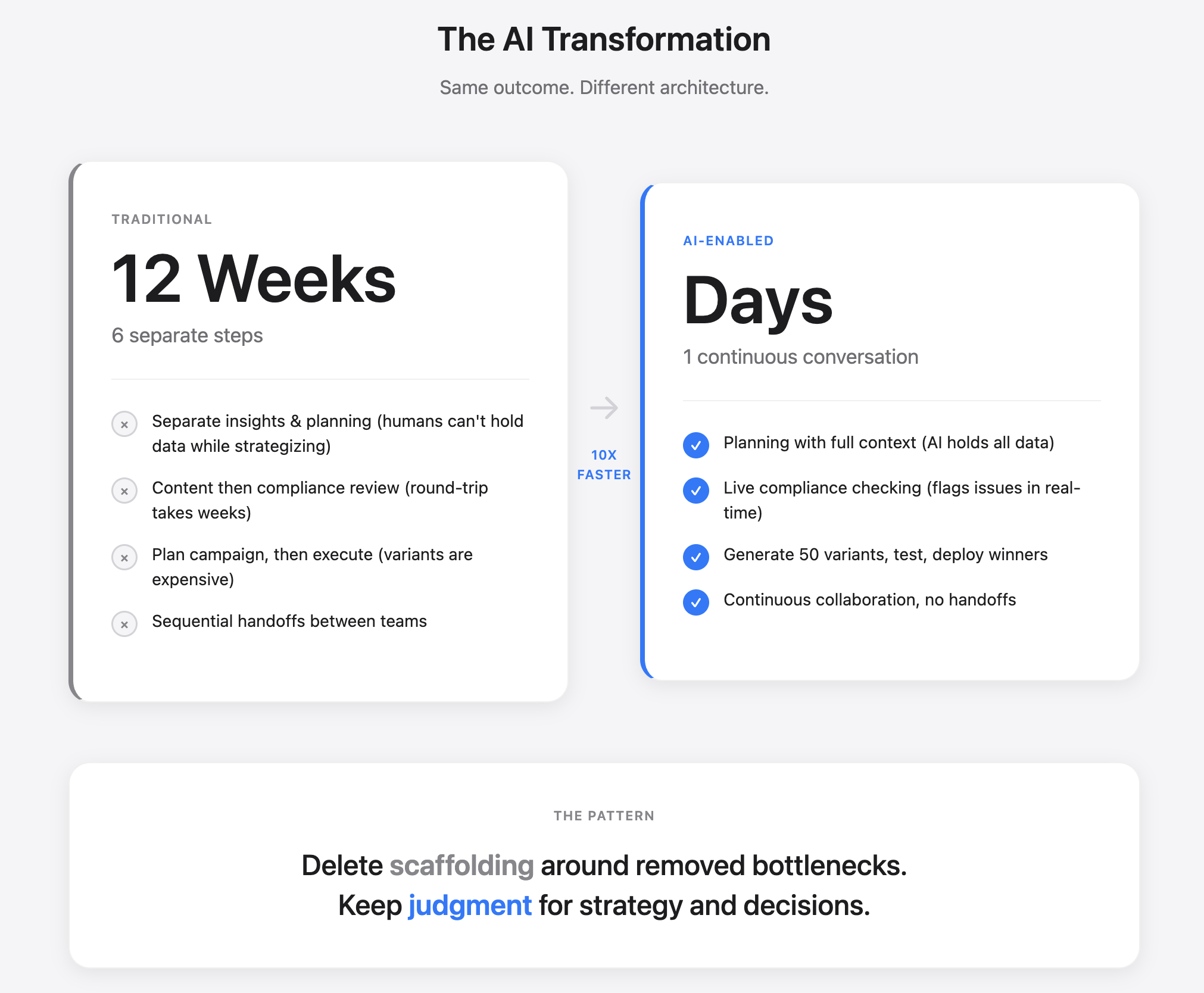
Traditional workflow:
Insights (2 weeks) → Planning (2 weeks) → Content (3 weeks) → Legal review (2-4 weeks) → Deployment (1 week)
Apply the framework:
Separate insights and planning?
- What bottleneck created this step? Humans can’t hold all data while strategizing
- Does AI remove that bottleneck? AI can.
- If the constraint is gone, what becomes unnecessary? → Delete the handoff. Keep strategic judgment.
Separate content and compliance?
- Humans can’t track 200 regulations while writing.
- AI can flag in real-time.
- → Delete the round-trip cycle. Keep expert review as continuous feedback, not a gate.
Plan, then deploy, then measure?
- Creating variants was expensive.
- AI makes it free.
- → Delete upfront planning meetings. Keep learning from results.
What you might build:
“Using latest inbound signals, derive insights to create [campaign] for [product] targeting [audience], flag compliance issues as we go, test 20 variants, launch best performers.”
Not 12 weeks. Days.
But this only works if regulatory accepts continuous compliance checking, your team can guide the AI effectively, and variants perform. If not, optimize instead.
The Strategic Choice
Most companies should optimize, not delete. If you have significant revenue, existing customers, or regulatory constraints — add AI features. Make things 30-50% better. That’s real value.
But understand what you’re betting on: Your competitive advantage might be scaffolding. If three steps become unnecessary, your expertise matters less.
Someone less skilled at the old workflow, but better at prompting AI, might outcompete you. That’s Cursor vs. traditional IDEs. Cora vs. elaborate email systems.
When should you switch from optimize to delete? When your validation experiments succeed and show that users genuinely can’t go back, that’s your signal to commit resources. For established players, run parallel experiments before betting the core business.
Valid responses:
Defensive: Optimize what you’re good at. You’re betting customers value the full workflow and your incremental improvement beats their architectural advantage. Sometimes that’s right. Sometimes it’s Blockbuster optimizing late fees.
Offensive: Allocate 10-20% to deletion experiments in adjacent areas—new customer segments, greenfield products, parallel teams. If something works, you get optionality without betting the company.
For zero to one: Start with deletion. Find where incumbents maintain scaffolding out of legacy, not necessity.
How to Explore
Pick one workflow. Give 3-5 people the most capable AI, full context, and one instruction: “Accomplish [goal] however makes sense.”
Watch what they stop doing. Steps they skip. Handoffs they avoid.
The signal they’ve found something is they say, “I don’t want to go back.”
Then validate what they arrived at. Does quality maintain? Do stakeholders accept it? Does it work for median users, not just experts?
Most explorations fail here. That’s fine. Optimize instead.
But if validated and you’ve found a new way to work, build the minimum product that makes the old way feel wrong.
The Core Questions
For each major feature:
- What bottleneck created this?
- Does AI remove that bottleneck?
- Can you delete the scaffolding while keeping the judgment?
- Would it make the old way feel wrong?
If all four are clear, test deletion. If any don’t hold, optimize instead.
The winners won’t be whoever deletes the most.
They’ll be whoever correctly identifies what to delete vs. what to optimize.
Most will optimize. They should. It’s safer, faster, and works.
But when someone deletes the right thing, and users try it, your optimized version feels like unnecessary complexity.
That’s when you lose. Not because you made bad features. Because you kept features that stopped mattering.
The folder system in your email client isn’t bad. It’s actually quite elegant.
It’s just scaffolding around a bottleneck that’s already gone.